Blooket Hacker Online
Unlock the full potential of Blooket with premium tools
How to Use the Extension
Blooket Hacker Online adds powerful tools to your Blooket experience. Follow these steps to get started.
1. Install the extension
Add the Blooket Hacker Online extension from the Chrome Web Store. After installation, a welcome page will open automatically (or open blookethackeronline.best in your browser).
2. Open Blooket and use the tools
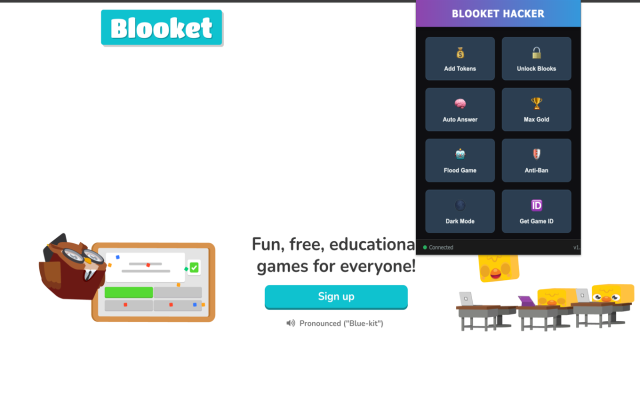
Go to blooket.com and sign in. Click the Blooket Hacker Online icon in your browser toolbar to open the popup with all features:
- Add Tokens – Add tokens to your account
- Unlock Blooks – Unlock Blooks in the game
- Auto Answer – Get automatic answers in quizzes
- Max Gold – Maximize gold in games
- Flood Game – Flood the game with bots
- Anti-Ban – Reduce detection risk
- Dark Mode – Toggle dark theme
- Get Game ID – Copy the current game ID
3. Use features on the right page
Some options work only on specific Blooket pages (e.g. dashboard, game lobby, or during a game). If a button does nothing, make sure you are on the correct Blooket page for that feature.
Tips
- Keep the extension updated for the latest features and compatibility with Blooket.
- Use Anti-Ban for a safer experience.
- Bookmark blookethackeronline.best to return to this guide anytime.